
Use-Case Guides · 8 min read
Giving Tuesday Video: Script Template and How to Record It
Lengths for email and social, a five-beat script template, three sample scripts, who should be on camera, and a desk setup one person can run alone.
Tom Baranowicz
Creator of GoTeleprompter · Published
A Giving Tuesday video should run 30–90 seconds, with one real person from your organization on camera. Build it around one story, one concrete number, and one clear ask with a deadline: today, before midnight. At about 140 words per minute, that's 70 words for 30 seconds and 210 for 90. Record it on a phone at your desk the week before, and post it on Giving Tuesday morning.
Below: lengths for email and social, a five-beat script template, and three sample scripts. You'll also see how to make the script easy to say out loud, plus a desk setup one person can manage alone. To size your script first, use the word budget calculator.
How long should a Giving Tuesday video be?
It depends on where people will watch it. At about 140 words per minute:
| Where it plays | Length | Words (at ~140 WPM) | Orientation |
|---|---|---|---|
| Email to your donor list | 60–90 seconds | 140–210 | Horizontal |
| Donation page on your website | 30–60 seconds | 70–140 | Horizontal |
| Instagram, Facebook, or TikTok | 20–45 seconds | 45–105 | Vertical, with captions |
| Thank-you video the next day | 20–30 seconds | 45–70 | Either |
You don't need four separate videos. Record one 60-second version for email, then cut a 30-second version from it for social. Write the script so the story, the number, and the ask still make sense with the middle trimmed out.
A five-beat Giving Tuesday script template
Most fundraising videos that work follow the same shape. Here it is, with rough timings for a 60-second video:
| Beat | What to say | Time |
|---|---|---|
| 1. One person | A single story with a name and a detail. Not a statistic. | 15 seconds |
| 2. The problem | One sentence on why it keeps happening. | 10 seconds |
| 3. What a gift does | Tie an amount to something concrete. | 10 seconds |
| 4. The ask | Say "give," say where, and say "today." | 10 seconds |
| 5. Thanks | End on the people, not the logo. | 10 seconds |
Fill-in template
[Name] came to us [when]. [One detail about their situation.] [One thing they said or did.]
At [organization], we see more [people like them] every month, because [one-sentence cause].
[Amount] gives [one concrete thing]. [Larger amount] gives [more].
Today is Giving Tuesday. Please give at the link below before midnight.
[What's happened to them since.] Thank you for being part of that.
Two notes on the ask. If you have a matching gift, say it here: "Every dollar given today is doubled, up to $10,000." And say the deadline out loud. "Before midnight" gives people a reason to give now, not later.
Sample Giving Tuesday video scripts
All three are examples. Only tell a real person's story with their permission (more on that below).
60-second email video: a food pantry
Last March, Daniel came to the pantry for the first time. He'd just lost his job, and he has two kids at home. He told me he almost didn't come in.
Here at Riverside Community Pantry, we see more families like Daniel's every month, because rent keeps going up and paychecks don't.
Twenty-five dollars puts a week of groceries on a family's table. Fifty dollars covers two.
Today is Giving Tuesday. If you can, please give at the link below before midnight.
Daniel's working again now, and last month he came back to volunteer. Thank you for being part of that.
30-second social video: an animal rescue
This is Biscuit. Three weeks ago, she was found tied to a fence behind a gas station. Today she's eating, wagging, and stealing socks.
Fifty dollars covers a week of food and vet care for a dog like Biscuit.
It's Giving Tuesday. Give at the link in our bio before midnight.
Biscuit says thank you. Or she would, if she'd stop chewing the leash.
20-second thank-you video for the next day
Record this on Wednesday morning, with your real totals.
Yesterday, 312 of you gave to our tutoring program, and together you raised $18,400. That's a full year of after-school tutoring for forty kids. We read every name. Thank you. In the spring, we'll show you what it paid for.
Who should be on camera
Usually not the executive director. The best messenger is the person closest to the work: the pantry coordinator, the volunteer who drives the van, the vet tech. People believe someone who was there.
- The person you helped, only if they want to. Ask without pressure, explain where the video will appear, and get written consent. Make it easy to say no.
- Keep faces out when consent is hard. For children, shelter residents, or anyone in a vulnerable spot, show hands, the place, and the work instead.
- One person, one take. A single voice is easier to follow than five people saying one line each. It's also far easier to record.
Make the script easy to say out loud
Fundraising copy is usually written for a brochure, and brochure sentences are hard to say. Before you record, paste the script into the speakability analyzer. It flags sentences over 25 words, words of four or more syllables, and passive voice. Fix those, and the read gets much smoother.
| Written for a brochure | Written to be said |
|---|---|
| "Our organization provides comprehensive nutritional assistance to food-insecure households throughout the region." | "We hand out groceries to families whose paycheck doesn't stretch to the end of the month." |
| "Services are delivered by a dedicated team of volunteers." | "Forty volunteers run the pantry, most of them on their lunch break." |
| "Your generous contribution will make an immediate impact." | "Twenty-five dollars fills a family's fridge for a week." |
Then read it out loud once. If you trip on a line, rewrite it. The guide to writing a teleprompter script has more on writing for the ear.
Read and record in one take on iPhone and iPad, or float your script over calls on Mac. Free to start.
How to record it at your desk, alone
You don't need a crew, a location, or a camera. One phone, a window, and about 30 minutes will do.
- Phone at eye level, an arm's length away. A small tripod or a stack of books works. Frame your head and shoulders.
- Face a window. Light in front of you, never behind.
- Make the room quiet. Close the door and turn off the fan. Soft things like a rug, curtains, or a full bookshelf cut echo. A wired lavalier mic helps if you have one.
- Put the script right under the lens. Big text, a few words per line, so your eyes stay near the camera.
- Record horizontal first, then vertical. One take for email and your website, then switch orientation and record one for social.
- Do two or three takes. Leave a second of silence at each end so you have room to trim.
- Optional: film five clips of the work. Hands, shelves, the van, 3–5 seconds each, to cut over the problem and the gift beats.
- Add captions. Plenty of people scroll social video with the sound off.
First time on camera? The guide on how to speak confidently on camera has a 10-minute warm-up routine.
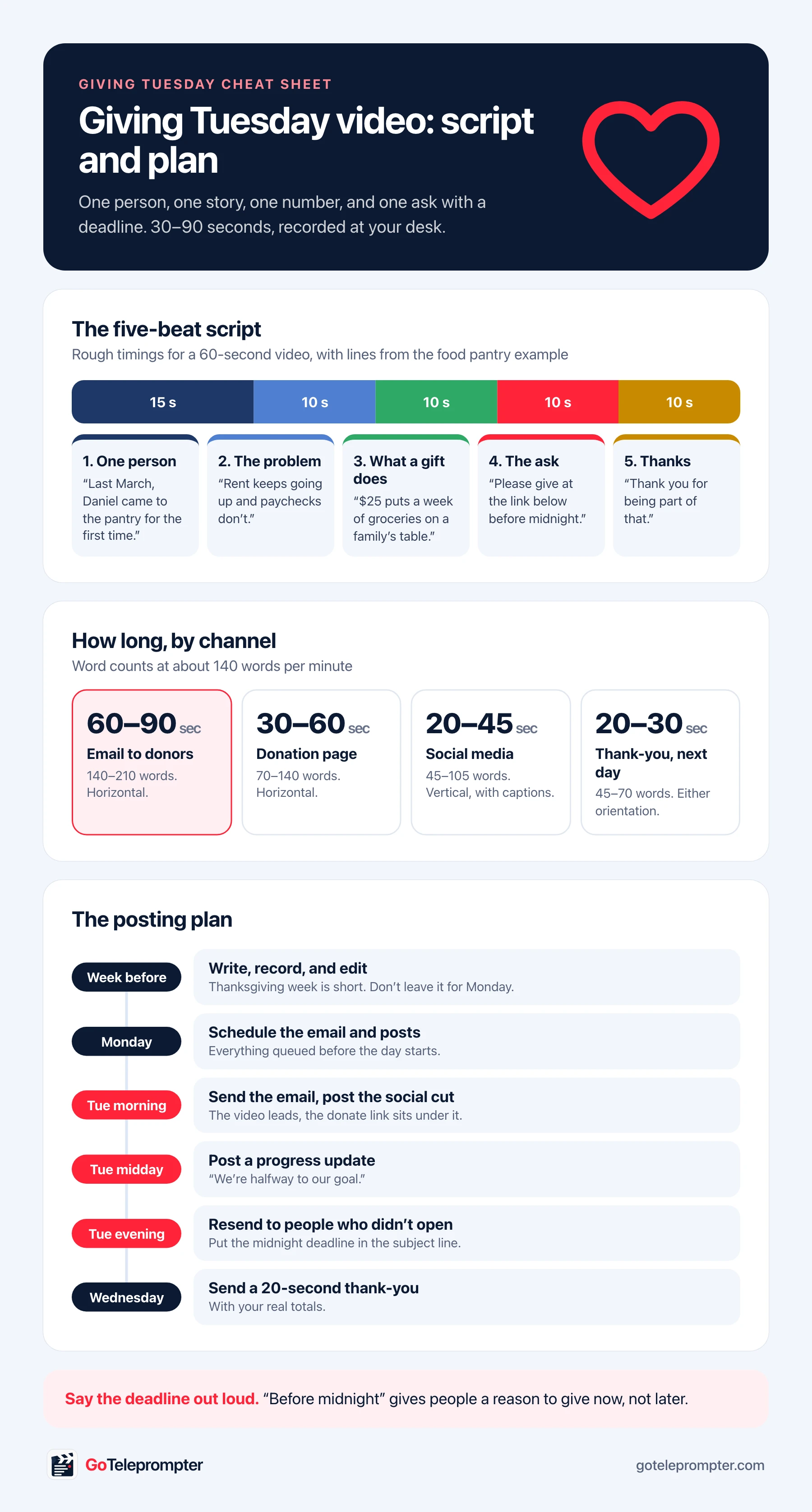
Giving Tuesday video cheat sheet
The five beats, the lengths by channel, and the posting plan, on one page.
Recording it with GoTeleprompter
I build GoTeleprompter, so here's how it fits. On iPhone and iPad you read and record in the same take, with the script over the camera. Choose horizontal for email or vertical for social. The video saves straight to Photos.
Fundraising scripts are read word for word, which suits Voice Follow. The script scrolls as you speak and waits when you pause, so you can take a breath after the story. Voice Follow requires iOS 26, iPadOS 26, or macOS 26 or later. On a Mac, the Mac app docks the script under the webcam and records at up to 1080p.
Volunteers on Android or Windows can use the free web teleprompter in the browser, with no signup. Its optional test recording runs up to 60 seconds and stays on the device, which is enough for a 30-second social cut. The apps are free for up to 2 scripts: one for the email version, one for the social cut.
When to post your Giving Tuesday video
- The week before: write, record, and edit. Thanksgiving week is short, so don't leave it for Monday.
- Monday: schedule the email and the posts.
- Giving Tuesday morning: send the email with the video and post the social cut.
- Midday: post a progress update. "We're halfway to our goal" gives people a reason to join in.
- Evening: resend to people who didn't open the first email, with the midnight deadline in the subject line.
- Wednesday: send the 20-second thank-you video with your real totals.
Planning a year-end appeal in December too? The guide to holiday video messages for clients and your team uses the same desk setup. For a personal thank-you to a supporter, the Thanksgiving video message guide has short scripts you can adapt.
Ready to record? GoTeleprompter is free to start on iPhone, iPad, and Mac.
FAQ
- How long should a Giving Tuesday video be?
- 60–90 seconds for an email to donors, 30–60 seconds for your donation page, and 20–45 seconds for social media. At about 140 words per minute, a 60-second script is around 140 words.
- What should a Giving Tuesday video say?
- Five beats: one person’s story, one sentence on the problem, what a specific amount pays for, a clear ask with the midnight deadline, and a thank-you that ends on the people you serve.
- Who should be on camera in a nonprofit fundraising video?
- Usually the person closest to the work, such as a program coordinator or volunteer, rather than the executive director. Feature someone you helped only with their written consent, and keep faces out of shot when consent is difficult.
- When should we post a Giving Tuesday video?
- Send the email and post the social version on Giving Tuesday morning. Post a progress update at midday, resend to people who didn’t open the email in the evening, and send a short thank-you video on Wednesday.
- Do we need professional equipment to record a Giving Tuesday video?
- No. A recent phone at eye level, a window in front of you, and a quiet room are enough. A wired lavalier mic helps, and a teleprompter keeps your eyes near the lens while you read.
Free online teleprompter