
Scripting & Delivery · 8 min read
How to Speak Confidently on Camera (Without Freezing Up)
Why the lens makes you nervous, a pre-record routine, fixes for fast talking, filler words, and swaying, and a one-week practice plan.
Tom Baranowicz
Creator of GoTeleprompter · Published
To speak confidently on camera, remove the things you're afraid of, then practice the habits that look confident. Know your first and last line by heart. Warm up your voice for two minutes. Sit tall with your hands in view, look at the lens as if it's one friend, and speak a little slower than feels natural. The rest comes from reps: a week of one-minute practice clips makes a real difference.
Below: why the camera makes you nervous, a 10-minute routine before you record, fixes for common nervous habits, and a one-week practice plan. Not sure how fast you talk? The speaking speed calculator measures it with a stopwatch.
Why the camera makes you nervous
Plenty of people who are relaxed in meetings freeze in front of a lens. A few things are going on:
- No feedback. In a conversation you see nods and smiles. A lens gives you nothing back, so your brain fills the silence with worry.
- Your recorded voice sounds wrong. When you talk, you hear part of your voice through the bones of your head. A recording skips that, so it sounds thinner and higher to you. Everyone else hears the recorded version every day. It's the one they know.
- Fear of forgetting. For most people this is the big one. It's also the easiest to remove.
- It feels permanent. A mistake on video can be replayed. But you control the edit, and nobody sees the takes you delete.
Before you record: a 10-minute routine
- Learn your first and last line. A strong start settles your nerves. A clear last line stops you from trailing off with "so, yeah."
- Script or outline the middle. Bullets work for a casual update. A full script is better when details matter. Not sure which? See teleprompter vs. cue cards vs. memorizing.
- Sort out the setup first. Light in front of you, lens at eye level, quiet room. Worrying about the tech eats the focus you need for talking. The iPhone setup guide covers framing and light.
- Warm up your voice for two minutes. Hum up and down your range, do a few lip trills, then read one paragraph out loud with exaggerated expression.
- Loosen your body. Shake out your hands, roll your shoulders, and take three slow breaths. Breathe in for four counts and out for six.
- Record a throwaway take. Tell yourself the first take doesn't count. It takes the pressure off, and sometimes it's the one you keep.
While you're recording
Talk to one person
Picture one friend sitting behind the lens. Say "you," not "you all" or "everyone out there." One viewer at a time is how people actually watch video, and it makes your tone warmer.
Look at the lens, not at yourself
Watching your own face on screen makes you self-conscious and pulls your eyes off the lens. Hide the self-view if you can, or put a small sticky note with an arrow right next to the camera. On a phone, that means the tiny lens at the top, not the screen.
Turn your energy up a notch
The camera flattens you. Normal conversational energy tends to read as tired on playback. Aim a little above how you'd talk across a table. If it feels slightly too much while recording, it usually looks right when you watch it back.
Slow down and pause
Nerves make you speed up. Most people sound best on camera at 140–160 words per minute, and nerves can push you well past that. Pause at every full stop. When you feel an "um" coming, pause silently instead. A one-second silence sounds confident. A filler word doesn't. The speaking rate guide has ranges for every format.
Keep your body steady and open
Sit tall on the front half of the chair, or stand with your feet hip-width apart. Keep your hands in the frame and gesture at chest height. Avoid swivel chairs. Swaying side to side is the most common nervous movement, and viewers notice it fast.
Keep going after a mistake
Don't stop the recording, sigh, or apologize. Pause, take a breath, and restart the sentence. Cut the stumble later. Stopping every time resets your energy and turns a small slip into a big deal.
Nervous habits and quick fixes
| Habit | What viewers notice | Fix |
|---|---|---|
| Talking too fast | Hard to follow, sounds anxious | Slow down by about 10% and pause at full stops |
| "Um" and "uh" | Sounds unsure | Pause silently instead |
| Eyes darting around | Looks evasive, or like you're reading | Lock onto the lens and put notes right under it |
| Swaying or swiveling | Distracting movement | Plant your feet; use a chair that doesn't turn |
| Hidden or fidgeting hands | Looks closed off | Rest hands in view and gesture at chest height |
| Flat voice | Sounds bored | Smile before the first line; stress one word per sentence |
| Apologizing for mistakes | Draws attention to them | Restart the sentence and edit it out |
A one-week practice plan
Confidence on camera is a skill, and skills come from reps. Spend five minutes a day on this. You don't have to publish any of it.
| Day | Exercise | Length |
|---|---|---|
| 1 | Talk about your day with no notes. Watch it once. | 60 seconds |
| 2 | Same again, but focus only on looking at the lens. | 60 seconds |
| 3 | Explain something you know well from three bullet points. | 90 seconds |
| 4 | Read a short script from a teleprompter. | 60–90 seconds |
| 5 | Redo day 3's topic, slower, with deliberate pauses. | 90 seconds |
| 6 | Record something real: a channel intro or a team update. | 2 minutes |
| 7 | Watch day 1 and day 6 back to back. | 5 minutes |
When you review, watch once with the sound off to check your body language. Then listen once without watching to check your voice. It's much easier to spot one problem at a time.
Does a teleprompter make you more confident?
For a lot of people, yes, because it removes the fear of forgetting. But it only helps if you read well. A flat, word-by-word read looks less confident than an imperfect answer in your own words.
Three things make the difference:
- Write the way you talk. Short sentences and contractions. The speakability analyzer flags long sentences and tongue twisters.
- Use big text and short lines. If you squint, it shows. See the formatting guide for font sizes by device.
- Start slow. Set the scroll to 130–140 WPM for your first sessions, then speed up once you're comfortable.
For the reading technique itself, see how to read a teleprompter naturally.
Confidence on camera cheat sheet
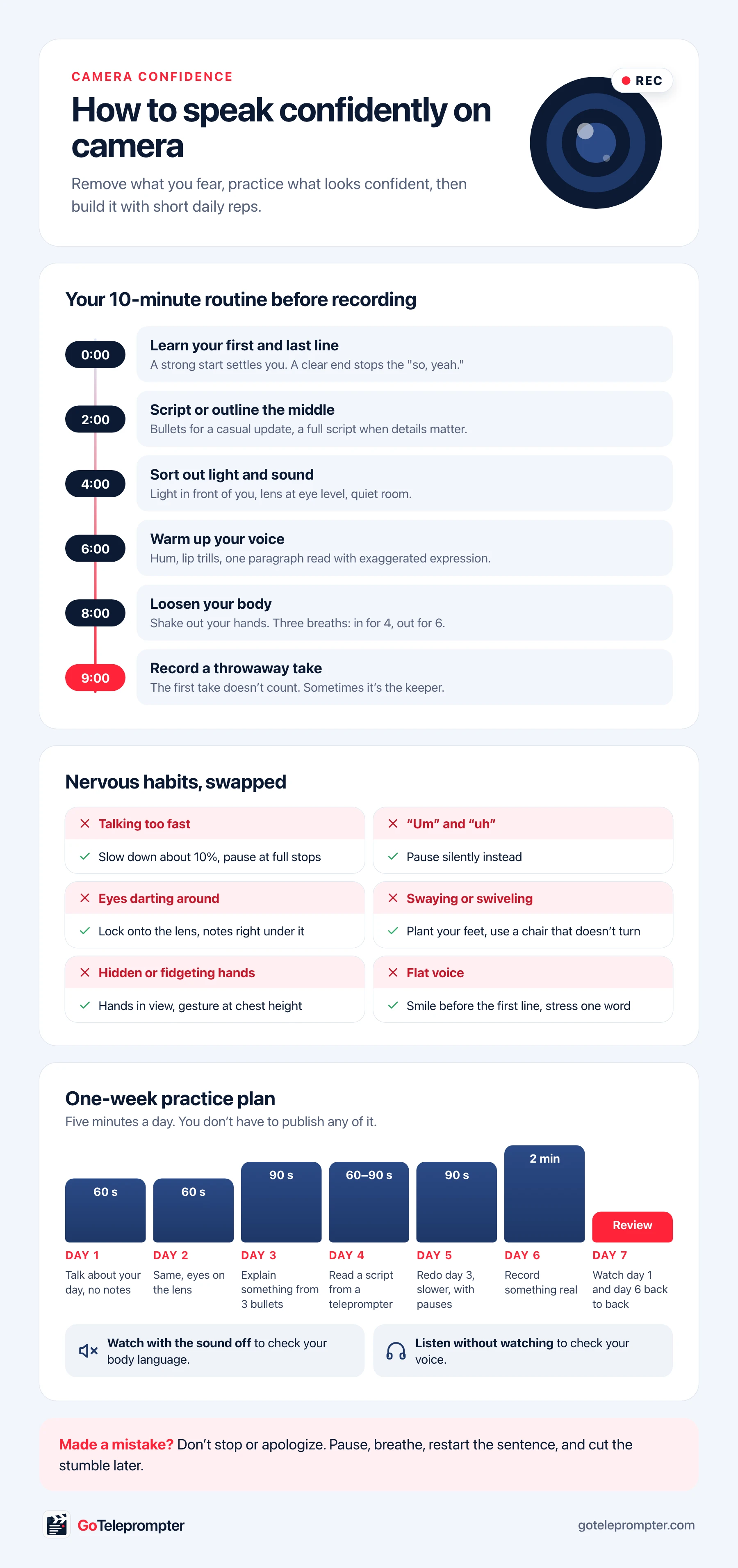
The routine, the habit fixes, and the practice plan on one page you can save or print.
Read and record in one take on iPhone and iPad, or float your script over calls on Mac. Free to start.
Practicing with GoTeleprompter
I build GoTeleprompter, so here's how it fits into this. On iPhone and iPad, your script sits over the camera and you can drag it right under the lens, so your eyes stay where they should. You read and record in the same take.
Voice Follow helps nervous speakers most. The script scrolls as you speak and waits when you pause. If you stop to breathe or restart a sentence, it doesn't run away from you. Voice Follow requires iOS 26, iPadOS 26, or macOS 26 or later.
On a Mac, the prompter floats under your webcam during calls and can be hidden from screen sharing in apps that respect it. Some apps that capture your entire screen may still show it, so do a quick test share before going live. The apps are free for up to 2 scripts.
No Apple device? The free web teleprompter runs in any browser, including Android and Windows. Set a slow scroll speed and use the 60-second test recording for your daily practice clips.
Start with day 1 today: one minute, no notes, one watch-through.
Ready to record? GoTeleprompter is free to start on iPhone, iPad, and Mac.
FAQ
- How can I be more confident on camera?
- Remove what you fear and practice what looks confident. Learn your first and last line, script or outline the middle, warm up your voice, look at the lens as if it were one friend, and speak a little slower than feels natural. Short daily practice clips build confidence faster than occasional long sessions.
- Why do I hate how I sound on video?
- When you speak, you hear part of your voice through the bones of your head, which makes it sound deeper and fuller to you. A recording skips that, so it sounds thinner. Everyone else already hears the recorded version, and most people get used to it after a week of practice clips.
- Where should I look when talking to a camera?
- At the lens, not at your own face on the screen. Hide the self-view if you can, or put a small sticky note next to the lens as a reminder. If you use notes or a teleprompter, place them as close to the lens as possible.
- How do I stop saying um on camera?
- Replace it with a silent pause. Slow down to around 140–160 words per minute and pause at every full stop, which gives your brain time to find the next words. A one-second silence sounds confident; a filler word does not.
- Does using a teleprompter help with camera confidence?
- Often, because it removes the fear of forgetting. It works best with a script written the way you talk, large text, and a slow scroll speed (130–140 WPM) while you get used to it.
Free online teleprompter